The Power of AI Video Generation
AI video generators leverage artificial intelligence to convert text prompts or scripts into compelling video content. They utilize pre-existing video assets, animations, and music libraries to create visually stunning and informative shorts. Many tools even offer AI-powered voiceovers and character animation, adding another layer of engagement.Benefits of Using AI Video for Social Media Shorts
- Save Time & Resources: Forget expensive video shoots or complex editing software. AI simplifies the process, allowing you to churn out high-quality content quickly.
- Boost Creativity: Explore countless style options, animations, and voiceovers to bring your ideas to life in fresh and exciting ways.
- Expand Reach: Tailor your content to different platforms with AI tools that offer social media-specific formats and aspect ratios.
- Maintain Consistency: Easily generate a steady stream of content without worrying about creative burnout.
Choosing the Right AI Video Generation Tool
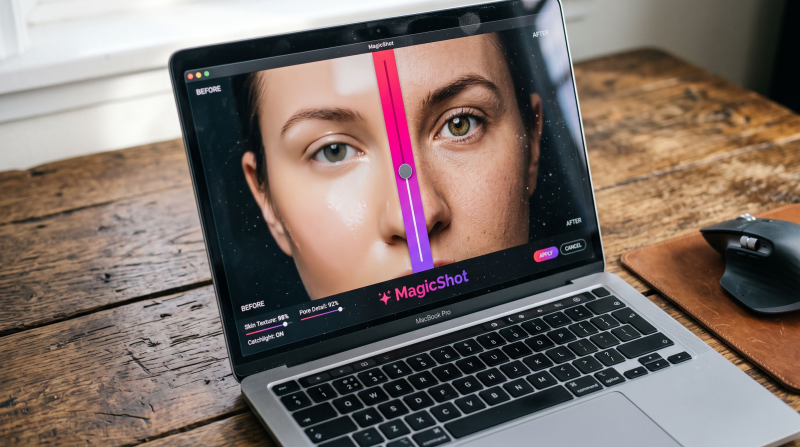
Several AI video generators cater to the needs of social media creators. Here's a breakdown of some leading options and their strengths:- MagicShot.ai: (Great for photo & video elements combined): While known primarily for its AI photo generation capabilities, MagicShot offers a surprisingly powerful video creation tool. You can combine its photo generation with its video editor to create unique social media shorts with a blend of realistic and creative visuals.
- InVideo AI: (Strong on customization): InVideo offers a user-friendly interface with extensive customization options. You can fine-tune the script, music, voiceover, and visuals to match your brand identity perfectly.
- Pictory: (Best for repurposing content): This tool excels at creating social media shorts from existing video content or blog posts. It streamlines the process of turning long-form content into bite-sized, engaging videos for various platforms.
- Synthesia: (Ideal for live-action style): If you're looking for AI-powered avatars to deliver your message, Synthesia shines. It creates realistic talking head videos using text prompts, perfect for educational or explainer content.
Crafting a Winning AI Video Concept
Before diving into the AI magic, a solid concept is crucial. Here are some tips to consider:- Know Your Target Audience: Who are you creating this video for? Tailor your message and tone to their interests and preferences.
- Focus on a Specific Goal: Do you want to educate, entertain, or inspire? Having a clear purpose keeps your content focused.
- Keep it Short & Sweet: Social media shorts thrive on brevity. Aim for a concise message delivered within the platform's time limit (usually 15-60 seconds).
- Hook Them Early: Grab viewers' attention within the first few seconds with a compelling opening, a surprising question, or a funny element.
- Tell a Story: Even in a short format, weave a narrative that keeps viewers engaged. Consider using a problem-solution framework or a relatable anecdote.
Step-by-Step Guide to AI-Powered Social Media Shorts
Once you have a powerful concept, follow these steps to transform it into a captivating AI video:1. Choose Your AI Tool:
Research available options and pick a tool that best suits your needs and budget. Many offer free trials to allow you to test the functionalities.2. Craft a Engaging Script:
- Even though AI generates visuals, a well-written script ensures clarity and consistency. Keep the language concise and conversational.
- Include a clear call to action at the end, encouraging viewers to visit your website, follow you on social media, or engage in a specific way.
3. Leverage AI Tools:
- Text-to-Video Conversion: Type your script into the tool's interface. The AI will generate a video based on your text and the platform's pre-existing assets.
- Style Selection: Many tools offer a variety of animation and editing styles. Experiment with different options to find what resonates most with your target audience.
- Add Voiceover and Music: Consider adding an AI-generated voiceover or uploading your own. Choose background music that complements the video's mood and message.
4. Refine and Edit:
- While AI does most of the heavy lifting, you can still add your personal touch. Edit the video to ensure smooth transitions and pacing.
- Trim unnecessary sections to maintain a concise and engaging format.
- Consider adding text overlays or graphics to emphasize key points or calls to action.
5. Optimize for Social Platforms:
- Choose the appropriate aspect ratio for each platform (vertical for TikTok and Instagram Reels, horizontal for YouTube Shorts).
- Add relevant hashtags and captions to improve discoverability.
- Consider using trending sounds or effects to boost engagement.
6. Test and Analyze:
- Before hitting publish, preview your video on different devices to ensure optimal viewing experience.
- Track performance metrics like views, likes, shares, and comments to understand your audience's preferences.
- Continuously experiment with different styles, formats, and content ideas to refine your approach.
Tips for Creating Engaging AI Videos
- Use Eye-Catching Visuals: High-quality visuals are essential for grabbing attention. Utilize AI's capabilities to create visually stunning and dynamic content.
- Keep it Authentic: While AI is a powerful tool, infuse your personality and brand voice into your videos.
- Experiment with Different Styles: Don't be afraid to try new things. AI allows you to experiment with various styles and genres without significant investment.
- Collaborate with Other Creators: Partner with other creators to tap into their audience and create unique content collaborations.
- Leverage User-Generated Content: Encourage your audience to create their own videos using your content or branded hashtags.
Conclusion
AI video generation has democratized video creation, empowering individuals and businesses to produce engaging social media shorts effortlessly. By following these steps and leveraging the power of AI tools like MagicShot.ai, you can create captivating content that resonates with your audience and drives results. Remember, consistency is key. Regularly publishing high-quality shorts will help you build a loyal following and establish your brand presence on social media. Embrace the potential of AI, and watch your social media engagement soar!
Try Countless AI Image, Video, and Audio features on MagicShot.ai
Generate realistic photos of anything. Imagine, describe and create those images within seconds. Enhance your existing photos with our advanced AI engine.
Download App Now