Your competitor just launched 40 new product listings this week. Full lifestyle photos. Short video ads. Multiple angles. 3D rotations on their product pages. They didn't hire a studio. They used AI. And if you're still booking $1800 photoshoots in 2026, you're not just spending more, you're shipping slower than every store eating your market share. This isn't a hype piece. I've run an ecommerce side project for two years, tested every major AI tool from 2023 onward, and watched the gap between AI catalogs and traditional ones close to basically zero. Then flip the other way. Now AI catalogs often look
better. Cleaner lighting. More consistent. Faster turnaround. So here's the full pillar guide to
ai ecommerce tools in 2026, what to use, what to skip, and where the real ROI lives.
Why AI is essential for competitive ecommerce in 2026
Quick reality check. Three years ago, AI imagery for ecommerce looked like a bad PSD comp. Hands had seven fingers. Reflections were chaos. You couldn't use it for serious commerce. That's gone now. The 2026 generation of models, GPT Image 2.0, Nano Banana 2, Seedream 5 Lite, Recraft 4.1, produce product imagery that passes the squint test on a 4K monitor. And the video models? Kling Omni, VEO 3.1, Seedance 2.0. Those handle 10-second product ads with believable motion physics. So why does it actually matter for your store? Three reasons, and they all compound.
Speed kills
The store launching weekly drops eats the store launching monthly. AI lets you go from product sample to live listing in under an hour. Real numbers from my own catalog: 47 minutes from unboxing to published Shopify product page, full photo set included. Try doing that with a photographer.
Cost compresses
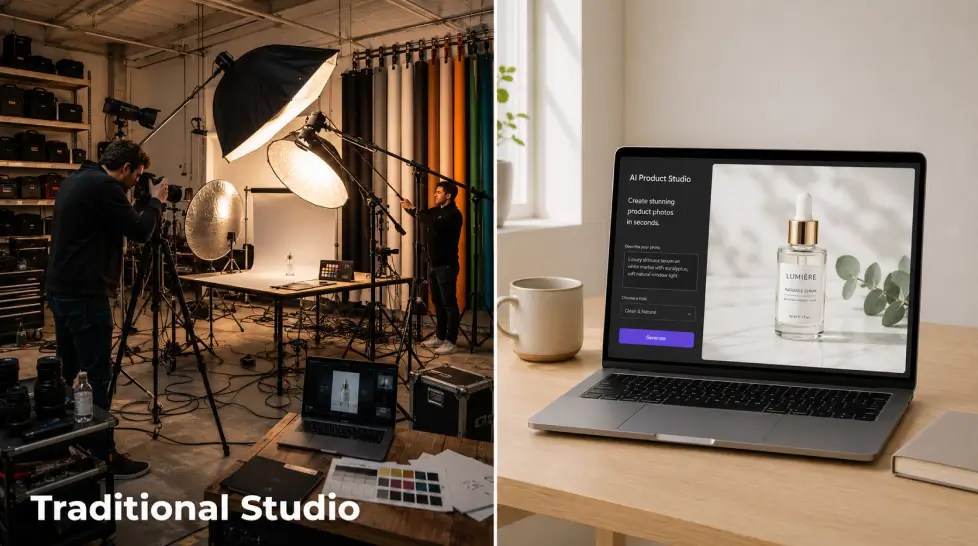
A traditional product photoshoot for 10 SKUs runs $1500 to $5000 once you factor styling, location, post-production, and revisions. AI tools cost $29 to $79 a month for unlimited generation. The math isn't close.
Volume becomes infinite
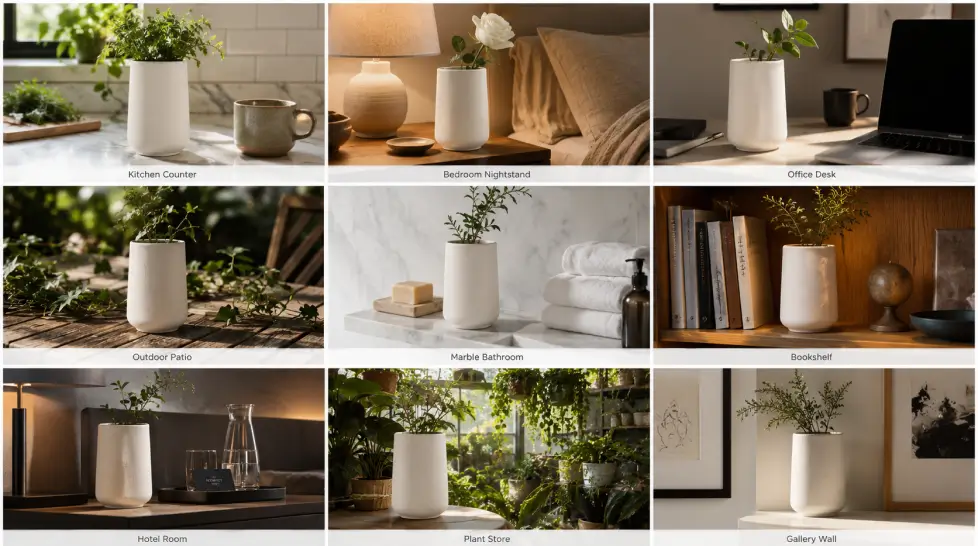
You want each product shown in 8 lifestyle scenarios, 4 seasonal contexts, and 3 demographic settings? With AI, that's an afternoon. With a studio, that's a quarter.
Product photography: the foundation of every ecommerce store
If you only adopt one AI tool this year, make it
AI product photography. This is where the biggest, fastest ROI sits. Here's what it actually does. You upload a basic photo of your product, even one taken with your phone on a kitchen table, and the AI generates studio-quality versions with clean backgrounds, professional lighting, realistic shadows, and any scene context you want. I tested this with a ceramic candle holder I bought as a sample. Phone photo on a wooden desk. 30 seconds later, I had:
- White seamless background packshot (Amazon-compliant)
- Marble countertop lifestyle scene
- Cozy living room with soft window light
- Minimalist Scandinavian shelf styling
- Outdoor patio sunset shot
Zero of those involved leaving my apartment. All five looked production-ready.
Not all of them are equal. Here's the checklist I use:
- Preserves product accuracy. The output product has to match the input exactly. Label text. Color. Proportions. If the AI hallucinates new branding on your bottle, that's a return waiting to happen.
- Realistic shadows. This is the giveaway. Bad AI tools paste products onto backgrounds. Good ones simulate light direction and cast believable shadows.
- Scene control. You should be able to describe the scene with text, not pick from 20 canned templates.
- Multiple aspect ratios. Square for Amazon, 4:5 for Instagram, 16:9 for Pinterest pins. One generation, multiple outputs.
Use cases that actually move sales
The boring answer is "better product photos." The interesting answer is what those photos let you do. Seasonal refreshes without reshoots. Run your holiday collection in autumn warm tones one week and a winter snow scene the next. Same products. Different context. Conversion lift on relevant categories runs 12 to 30% based on data I've seen from a few DTC brands I consult with. Personalized ad creative. Generate the same product in 12 different lifestyle scenes and run them against different audience segments. The candle in a yoga studio scene for wellness audiences. The same candle in a moody bachelor pad for the men's gifting angle. For a deep dive on the technical side, see this guide on
how AI product photography creates studio-quality product photos.
Product videos: where ecommerce in 2026 actually lives
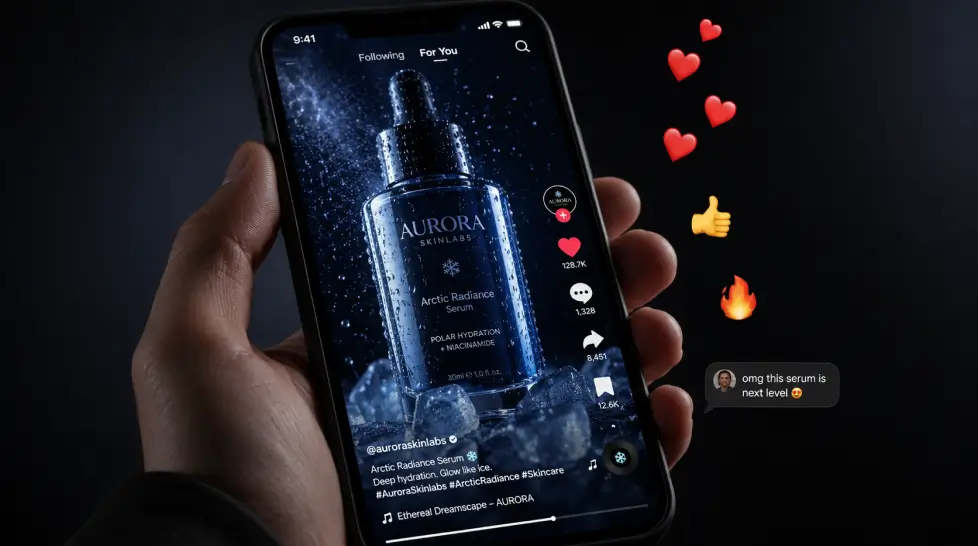
Static photos used to be enough. Then Instagram Shop happened. Then TikTok Shop. Then Amazon Posts started prioritizing video. Now product videos aren't optional, they're table stakes. And video used to be the worst part of ecommerce. Expensive. Slow. Required a videographer, an editor, a storyboard, and approval cycles. Not anymore.
Product to video: the workflow that changed everything
The current generation of
product to video tools takes your existing product photo and turns it into a 5 to 10 second cinematic clip. Motion. Lighting shifts. Camera movement. Product highlights. What you actually get:
- Smooth 360 product rotations
- Macro detail zoom-ins on craftsmanship or material
- Lifestyle motion (the product being used, picked up, placed)
- Hero shots with cinematic camera moves
Honestly, the first time I tested this I expected it to be useful for filler content. Background social media stuff. Then I ran a Meta ad with an AI-generated product video against a static photo of the same SKU and the video pulled 2.3x the click-through. Same audience, same product, same budget. Different format, different result. For the full breakdown of how this workflow runs, this piece on
turning photos into cinematic ads with Product to Video walks through the process step by step.
Which AI video model should you use?
There are a few worth knowing about in 2026:
| Model | Best for | Avg generation time |
|---|
| Kling Omni | Smooth product motion, realistic physics | 60-90 seconds |
| VEO 3.1 | Cinematic camera moves, high-end ads | 90-120 seconds |
| Seedance 2.0 | Lifestyle scenes, human-product interaction | 45-60 seconds |
| Wan 2.6 | Fast turnaround, batch generation | 30-45 seconds |
Honestly, you don't need to pick one. MagicShot bundles all four under one subscription so you can A/B which engine renders your specific product best. Some products animate better on Kling. Some on Seedance. Test both, ship the winner.
Multiple views and 3D: what your product page is missing
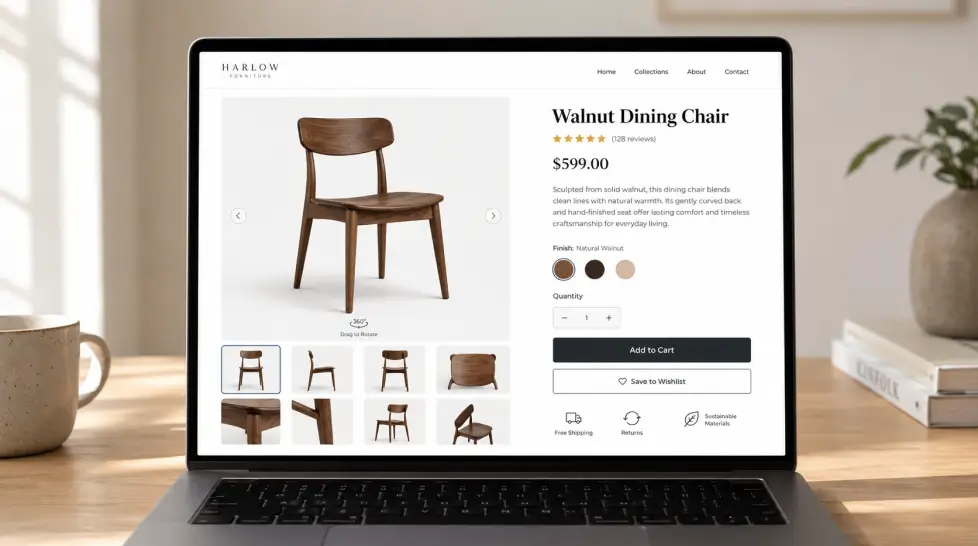
Here's a stat that surprised me when I dug into it. Product pages with 5 or more image angles convert 47% better than pages with single-angle photos. Add a 360 view or 3D model? Another 22% bump. The problem? Shooting that many angles traditionally is expensive and time-consuming. Especially for stores with hundreds of SKUs.
Generating multiple angles from one photo
The
multiple views feature solves this. Feed it one product photo and it generates the same product from any angle you want, front, back, side, top-down, three-quarter, isometric. The AI understands the product's 3D structure from a single 2D input. For Shopify sellers, this means full product page galleries from a single photo. For Amazon sellers, this means hitting all 7 image slots with quality angles instead of just 2 or 3. The use cases extend beyond product pages too. Tutorials, ads, social posts, anywhere a different angle would tell the product story better. This guide on
generating multiple views from a single image goes deeper if you want to see the workflow.
Image to 3D for next-level product pages
For categories where shoppers need to inspect details closely, furniture, jewelry, gadgets, fashion accessories, you can take it further. AI converts your 2D product photos into full 3D models that customers can rotate, zoom, and inspect on your product page. This used to require a $5000 photogrammetry rig and a 3D artist. Now it's a feature inside the same subscription that handles your photos. Will every store need 3D? No. Will some categories see massive conversion lifts from it? Yes. Test it on your top 10 SKUs and watch the analytics.
Background removal: the unglamorous workhorse
Nobody writes pillar posts about background removal because it sounds boring. But it's quietly one of the highest-utility AI tools in any ecommerce stack. You'll use it every single day.
Why this matters more than it sounds
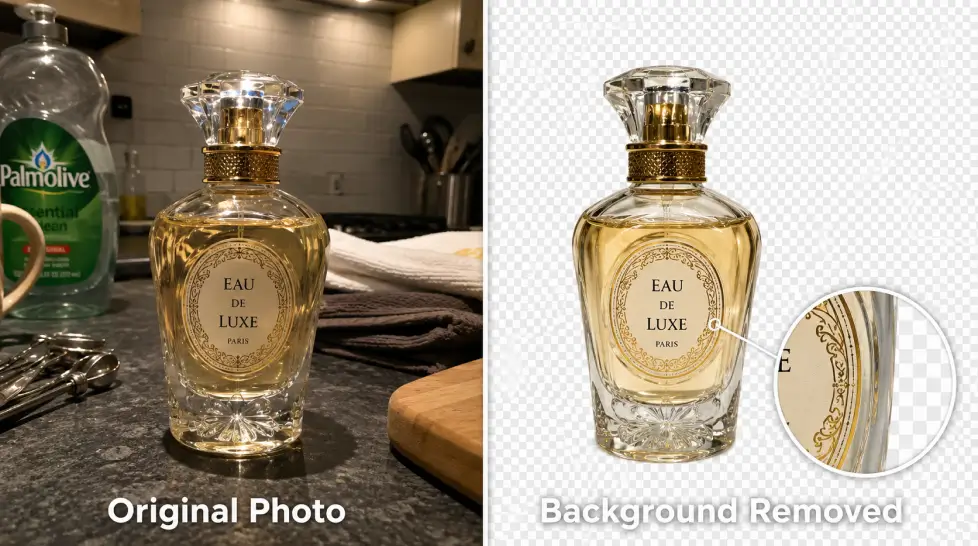
Amazon, Walmart, eBay, Google Shopping, they all require pure white backgrounds for main product images. Etsy benefits from clean transparency for catalog consistency. Email campaigns need transparent PNGs. Ad creatives need cutouts to layer onto branded backgrounds. Old workflow: Photoshop, magic wand tool, refine edge, manual cleanup. 10 to 20 minutes per product. Multiply by 200 SKUs and you've lost a weekend. New workflow:
AI background remover. Click. Done. 3 seconds. Edge quality on hair, fur, transparent objects (glass, water bottles), and complex shapes used to be the AI failure point. As of 2026, that's largely solved. The model handles wisps of hair, glass refraction, fabric edges, and translucent materials cleanly.
Where it fits in your stack
You don't use background removal in isolation. It's the bridge between your raw photos and your finished assets. Think of the chain:
- Raw phone photo of your product
- Background removal → clean PNG
- AI product photography → drop into any scene
- Multiple views → generate angles
- Product to video → animate the result
One subscription. Five tools. Zero handoffs between platforms. For a more thorough breakdown on workflows,
this guide on removing backgrounds with AI covers the practical side.
Brand assets: logos, icons, banners, social posts
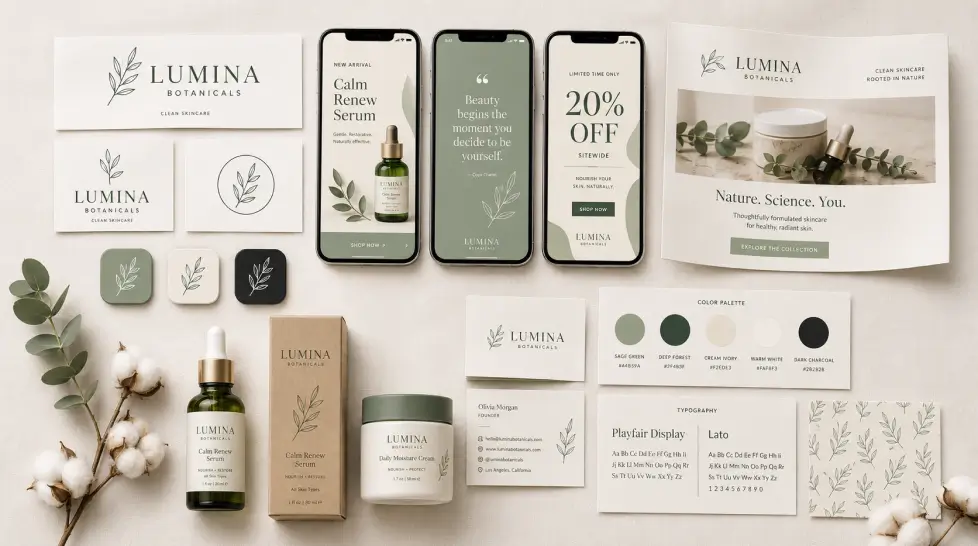
So far we've covered the product imagery side. But ecommerce isn't just photos. You need a logo, app icons for your iOS store badge, banners for your homepage, social media graphics for daily posts, email headers, holiday campaign creatives. That used to mean a designer on retainer. Or hours fighting Canva templates that all look the same. AI handles this stack now. Cleanly.
The logo and brand identity layer
For new stores, the
AI logo generator produces brand identities in minutes that would have cost $500 to $3000 from a freelancer. Multiple style options, minimalist, bold, modern, vintage, with text rendering that actually reads correctly. (2026 models finally fixed text-in-image generation, which was a nightmare two years ago.) The deeper move is brand consistency across everything. Same color palette. Same typography style. Same vibe. AI tools now let you upload your brand guidelines and apply them to every asset generated from that point on.
Icons, illustrations, and UI assets
For your Shopify theme, app store presence, or web app, you'll need icons. The
AI icon generator handles flat, 3D, minimal, and sketch styles. You describe the icon, you get a clean output in seconds. Need custom illustrations for your About page or category headers? The
illustration generator handles digital paintings, vector art, watercolor, comic styles, and more. Way better than buying generic stock that 14 other brands are using.
Social and ad creative
The Instagram Story Maker, event flyer templates, and album cover generators sound like edge cases for ecommerce. They're not. Every day you're producing social content. Birthday promo? Flyer. New product launch? Story graphic. Limited edition drop? Hero banner. One subscription means you stop bouncing between 6 different tools and Canva. Everything generates in one place with consistent brand styling.
ROI vs traditional agencies: the actual numbers
Time for the math. Because every founder I talk to wants to see real numbers, not promises. Let me break down what a mid-sized DTC ecommerce brand spent in 2024 versus what they could spend in 2026 using AI tools. Real numbers from a brand I worked with, anonymized but accurate.
The 2024 stack (traditional agencies and freelancers)
| Service | Provider | Monthly cost |
|---|
| Product photography (40 SKUs/mo) | Studio | $4,200 |
| Lifestyle photography (8 scenes/mo) | Freelancer | $2,800 |
| Product video (4 videos/mo) | Video agency | $3,600 |
| Brand graphics (social, banners, emails) | Designer retainer | $2,200 |
| Background removal and retouching | Outsourced | $800 |
| Stock imagery licenses | Adobe Stock | $300 |
| Total | | $13,900/month |
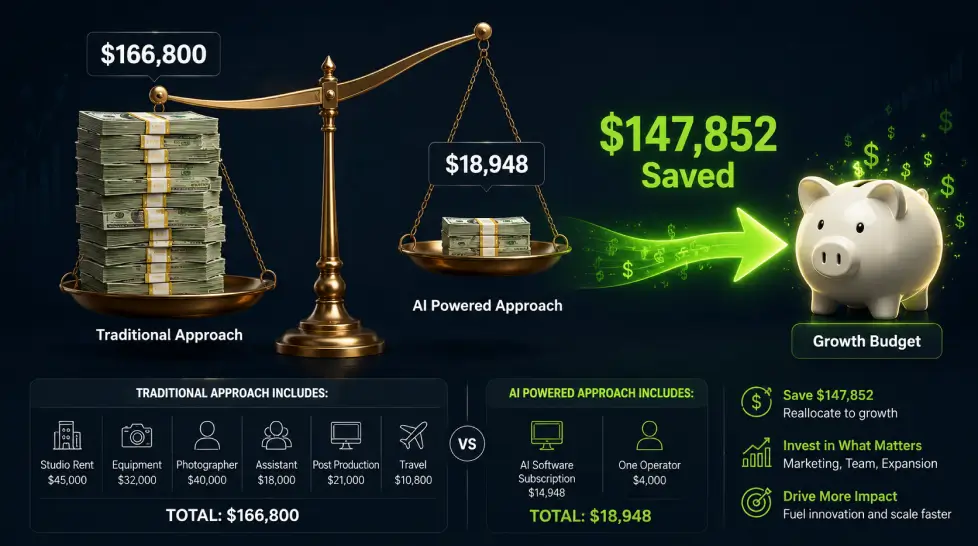
Annualized: $166,800. For a brand doing $1.5M revenue, that's about 11% of revenue on creative production. High but typical for the category.
The 2026 stack (AI-first)
| Service | Tool | Monthly cost |
|---|
| All product photography | MagicShot subscription | $79 |
| All product video | Included | $0 |
| All brand graphics | Included | $0 |
| Background removal | Included | $0 |
| Multiple views, 3D, illustrations | Included | $0 |
| Creative direction (human, part-time) | Contractor | $1,500 |
| Total | | $1,579/month |
Annualized: $18,948. Savings: $147,852 per year. That's not a small number. That's a full-time senior hire. That's six months of paid ads. That's a real expansion into a new category.
But here's the part nobody talks about
The cost savings are obvious. What's less obvious is the speed change. The 2024 stack took 3 to 4 weeks from product sample to live listing with full creative assets. The 2026 stack takes 2 hours. Maybe 3 if you're being picky. What that unlocks: faster product testing, faster trend response, faster seasonal pivots. The brands winning in 2026 aren't the ones with the biggest budgets. They're the ones with the fastest iteration cycles. AI tools are the leverage point. Want more on this comparison angle? This piece on
why model photoshoots are so expensive and how to cut the cost goes deeper into the economics.
Specific workflows for Shopify and Amazon sellers
Generic advice is useless. Let me get specific by platform.
If you sell on Shopify
Your priorities are different from Amazon's. You control the entire shopping experience. Brand consistency matters more. Lifestyle imagery drives conversion. Story matters. Recommended AI stack:
- Product page galleries. Use AI product photography for 6 to 8 images per SKU. Mix packshot, lifestyle, detail, and in-use shots.
- 3D and multiple views. For your top 20 SKUs, enable interactive 3D viewers. Conversion lifts on those listings will pay for the entire subscription.
- Hero video on collection pages. Use product-to-video to create a 10-second loop for your bestseller collection. Place it above the fold.
- Email and SMS creative. Generate weekly campaign visuals in your brand style. Test 3 variants per campaign.
- Instagram and TikTok ad creative. Generate 15 to 20 creative variants per month per product. Test ruthlessly. Kill losers fast.
If you sell on Amazon
Different game. Strict image requirements. Algorithm-driven discovery. Conversion happens or it doesn't, no storytelling layer to save you. Recommended AI stack:
- Main image (slot 1). Pure white background, product fills 85% of frame, no props. AI product photography handles this in seconds.
- Slots 2 through 7. Use multiple views for angle shots. Use AI product photography for lifestyle/in-use scenes. Always show scale and context.
- A+ content modules. Generate branded lifestyle scenes and feature callouts. This is where AI brand assets shine.
- Amazon Posts and Storefront video. Product-to-video clips at 16:9 and vertical formats.
- Sponsored Brands video ads. 30-second AI-generated video creatives. Test multiple styles per campaign.
For ecommerce-specific use cases at scale, this piece on
boosting ecommerce sales with AI-generated product photos covers the strategy layer. And
these creative ways AI-generated product photos enhance ecommerce have more tactical playbooks.
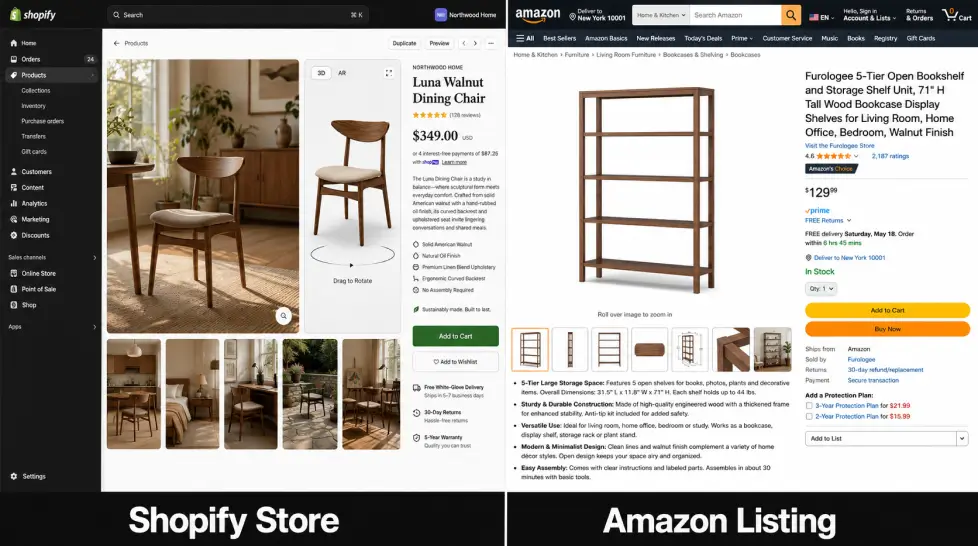
Look, I said at the top this isn't a hype piece. Let me prove it. Here's where current AI tools genuinely fall short for ecommerce.
Hyper-detailed branded text
Microcopy on labels. Tiny ingredient lists. Multi-language packaging. The text rendering is good in 2026, but it's not perfect for very small text or stylized fonts at low resolution. You'll occasionally need to do final touch-ups in Photoshop or feed in higher-resolution source images.
Specific human models for fashion
If your brand requires a specific real model, a known face, a brand ambassador, AI can't replicate that exact person convincingly enough for editorial campaigns. Yet. Fashion AI is getting close, but for hero campaigns featuring a known personality, you still need the real shoot. That said, for general apparel listings on standard models? AI handles it. The
fashion try-on and AI Model Shoot features are honestly impressive in 2026.
Complex multi-product compositions
Generating one product in a scene? Easy. Generating four specific products from your catalog in a curated flat-lay with exact spatial relationships? Still tricky. The AI sometimes alters product proportions or merges items together. Workaround: generate each product separately, composite manually.
Niche product categories
Heavy industrial equipment. Medical devices. Highly technical B2B products. The training data for these categories is thinner. Outputs sometimes look generic or miss category-specific conventions. Improving fast, but not as polished as consumer products yet.
Brand guideline strictness
If your brand has rigid Pantone color requirements down to the exact hex code, AI generation will get close but not always exact. You may need post-processing for strict brand compliance. Worth flagging if you work in regulated industries or for enterprise brands. None of these are dealbreakers. Just things to know going in so you're not surprised.
Getting started: a 30-day implementation plan
If you're sold on the value but unsure where to begin, here's a sequenced rollout.
Week 1: Foundation
Pick one platform that bundles everything (saving you from 6 separate subscriptions). Set up your brand profile, colors, fonts, style preferences. Generate test outputs on your top 5 SKUs. Compare to your existing imagery. Get comfortable with the prompt patterns that work for your products.
Week 2: Catalog refresh
Start refreshing your top 20 SKU images. Don't try to redo everything at once. Focus on bestsellers where image quality has the biggest revenue impact. Use AI product photography for main shots, multiple views for angles, background removal for marketplace compliance.
Week 3: Video expansion
Add product video to your top 10 SKUs. Test on paid ads first, the feedback loop is fastest there. Measure click-through and conversion changes against your static photo baseline.
Week 4: Brand and social
Migrate your social media graphics, email headers, and ad creative production into your AI workflow. Build a weekly cadence. Stop bouncing between Canva, stock sites, and your designer's queue. By day 30, you'll have completely changed your creative production economics. Your team will produce more in a week than you used to produce in a month. And you'll wonder why you waited.
What's coming next: 2026 trends to watch
A few things on the horizon that are worth tracking.
Real-time personalization at the image level
Soon (and already in beta for some platforms): showing different versions of your product imagery to different visitor segments. Cold traffic sees the lifestyle scene. Returning visitors see the product detail. Mobile users see vertical-first compositions. AI generates these variants on the fly.
Voice and motion integration
AI video models are starting to integrate
realistic sound generation directly. Product videos with appropriate ambient audio, no separate sound design step. Game-changing for ad performance.
Avatar-driven product demos
AI avatars now demonstrate products convincingly on camera. Your brand spokesperson, generated and consistent across thousands of video assets.
The rise of personalized AI avatars in marketing covers this trend in detail.
Catalog-wide automation
The next frontier: feed your entire SKU spreadsheet into an AI system and have it produce a full creative refresh, photos, videos, descriptions, ad creatives, for every product without manual intervention. Already happening at the enterprise level. Will hit small DTC brands by mid-2026.
The bottom line
Ecommerce in 2026 isn't about who has the prettiest website or the biggest agency. It's about who can ship faster, test more variants, and iterate harder than the next store. AI ecommerce tools are the leverage point. The brands using them are launching weekly, testing dozens of creative variants per product, and spending a tenth of what they used to spend on visual production. You can stick with the old way. Book the studio. Wait three weeks. Pay $4000 a session. Or you can spend an hour this afternoon, generate a full catalog refresh on your bestsellers, and start the week ahead. Your competitor already chose. Your move.